

Reduce your doxxing risk right now by locking down three things: your primary phone number, your home address, and any recovery email tied to public accounts. Those three details are what most attackers chase first, because they turn an anonymous online argument into a real-world threat.

In the next 10 to 60 minutes, you can:
- Set your main social media profiles to private or friends-only.
- Remove your phone number and address from public-facing bios and old posts.
- Turn on two-factor authentication for email, banking, and social accounts.
- Run your own name through Have I Been Pwned to check for leaked credentials.
- Change any reused passwords tied to a personal email.
If someone has already published your address or workplace, your first call is to the platform’s abuse or safety team, followed by local law enforcement if you feel physically unsafe. The UC Berkeley Office of Ethics, Risk, and Compliance Services frames this as a sequence: secure accounts first, document everything second, report third. The Department of Homeland Security echoes that order in its own guidance for individuals facing doxing threats.
Pro Tip: Screenshot everything before you delete or block anyone. Evidence disappears the moment an attacker realizes you’re building a case against them.
Key Takeaways
Doxxing prevention works when you combine locked-down accounts, a smaller public data footprint, and active breach monitoring, backed by a response plan if it happens anyway.
| Point | Details |
|---|---|
| Act on the first 60 minutes | Set profiles private, remove your phone number and address from bios, and enable two-factor authentication immediately. |
| Separate public and private identities | Use distinct emails, usernames, and profile photos for public-facing accounts versus your legal-name accounts. |
| Strip metadata before posting | Check photos for embedded GPS and timestamp data outside major platforms that auto-strip it on upload. |
| Treat data-broker removal as ongoing | Recheck broker listings every three to six months since companies keep re-adding resold data. |
| Build a response plan before you need it | Streetsafeselfdefence’s digital risk and mobile training help you pair online safety habits with real-world response skills. |
Table of Contents
- What Is Doxxing and How Do Attackers Find You?
- Building Your Personal Cybersecurity Checklist
- How Do You Secure Your Devices and Home Network?
- How Do You Audit Your Social Media and Online Footprint?
- How Do You Remove Your Information From Data Brokers?
- How Do You Monitor for Leaks and Early Warning Signs?
- What Should You Do in the First 24 to 72 Hours of Being Doxxed?
- How Do Compartmentalized Identities Reduce Your Risk?
- How Street Safe Self Defence Complements Your Digital Safety Plan
- Where to Learn More and Get Help
- Frequently Asked Questions
- Sources
What Is Doxxing and How Do Attackers Find You?
Doxxing means publishing someone’s private information, usually their real name, address, phone number, workplace, or family details, without consent and with the intent to harass, intimidate, or expose them. The term comes from “dropping docs,” 1990s hacker slang for releasing someone’s identifying paperwork as a form of retaliation.
Attackers rarely need to hack anything. Most doxxing relies on open-source intelligence (OSINT), meaning publicly available information stitched together from multiple sources. Common tactics include:
- Reverse image searches that link a profile photo across platforms and reveal a real name.
- Data-broker lookups that surface home addresses, phone numbers, and relatives.
- WHOIS records exposing the registrant behind a personal website or blog.
- EXIF metadata hidden in photos, revealing GPS coordinates and device details.
- Old breach data pulled from leaked databases and cross-referenced with current usernames.
- Social engineering, where an attacker tricks a support line or acquaintance into handing over details.
Your actual risk depends on who’s targeting you. A casual troll digging through your Instagram for five minutes poses a different threat than a coordinated harassment campaign with dozens of participants pooling information. The Stanford HAI research on data brokers notes that this information gets resold continuously, which means a one-time cleanup rarely holds.
Building Your Personal Cybersecurity Checklist
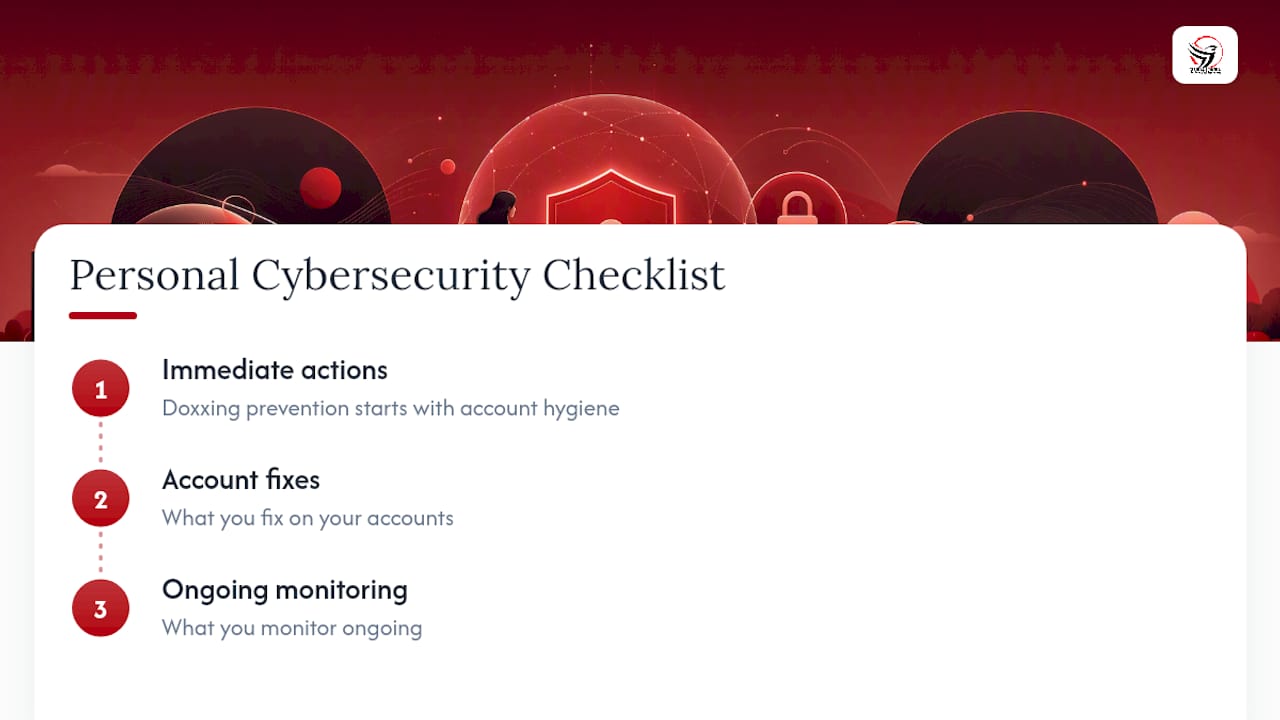
Doxxing prevention starts with account hygiene most people never revisit after setup. The UC Berkeley OERC guide organizes this into layers: what you do immediately, what you fix on your accounts, and what you monitor ongoing. Here’s how to work through it without burning a whole weekend.
Separate your public and private identities
Use one email for banking, medical, and legal correspondence, and a completely different one for anything public-facing, like a blog, a business page, or a hobby forum. This single habit, done early, prevents an attacker from pivoting from your public persona straight into your real inbox. Avoid cross-linking the two. If your public Twitter account and your private Gmail share a recovery number, they’re not actually separate.
Time cost: 15 to 20 minutes to set up a new email address and update your public bios.
Fix your passwords and authentication
Reused passwords are the single easiest way an attacker builds a profile on you. Once one account leaks, credential-stuffing tools try that same password everywhere else automatically.
- Use a password manager (Bitwarden, 1Password, or similar) to generate and store unique passwords for every account.
- Prefer an authenticator app or a hardware key over SMS-based two-factor authentication, since SIM-swapping can intercept text codes.
- Update your recovery phone number in account settings to remove any number an attacker could find in old posts or forum signatures.
Time cost: 20 minutes for your top five accounts (email, banking, social media, phone carrier, cloud storage).
Pro Tip: Not all two-factor authentication is equal. SMS codes are better than nothing, but authenticator apps like Authy or Google Authenticator are harder to intercept, and a physical security key like a YubiKey is the strongest option if you’re a higher-risk target, such as a journalist, activist, or public-facing professional.
Clean up account recovery fields
Go into each major account (email, banking, social platforms) and check what phone number and secondary email are listed for password recovery. These fields are often forgotten leftovers from years ago, sometimes tied to a landline your family still uses or an old number that’s now recycled to someone else.
- Replace old recovery numbers with a number that isn’t publicly searchable.
- Use an alias email for recovery on accounts you rarely log into.
- Remove your full birthdate from account settings where it’s not legally required.
Time cost: 10 minutes per account, so budget an hour if you’re tackling five to seven accounts in one sitting.
Triage by exposure, not by convenience
Start with whichever account has the most followers or public visibility, not whichever is easiest to fix. A locked-down personal Facebook does you little good if your public LinkedIn still lists your cell number in the summary section.
How Do You Secure Your Devices and Home Network?
Your accounts can be flawless and you’ll still be exposed if your devices leak data on their own. Keep your phone and laptop’s operating systems updated. Software updates routinely patch vulnerabilities attackers use to access stored data, and delaying them leaves a known gap open.

Turn on full-disk encryption if it isn’t already active. Most modern phones encrypt by default, but laptops sometimes don’t, so check your settings directly. Pair that with a strong local passcode and a short auto-lock timer, and know in advance how to remotely lock or wipe the device through your phone’s manufacturer account if it’s ever lost or stolen.
A VPN is worth clarifying here, because people overestimate what it does. A VPN masks your IP address from the sites you visit, which helps prevent an attacker from geolocating you through your connection. It does not remove information you’ve already posted, scrub you from a data broker’s database, or protect an account with a weak password. Think of it as one layer among several, not a doxxing shield on its own.
On public Wi-Fi, disable file and printer sharing, and turn off automatic connection to open networks. Where a secure institutional network like eduroam is available, prefer it over an unsecured café connection. Review your phone’s app permissions periodically. An app asking for your precise location when it has no functional need for it is a leak waiting to happen.
How Do You Audit Your Social Media and Online Footprint?
Doxxing prevention often comes down to what you’ve already posted and forgotten about. Run through this audit once, then repeat it every few months.
- Review your privacy settings on every platform. Set personal accounts to friends-only or followers-only, and separate any public professional profile from your personal one entirely.
- Search your own name and old usernames. See what still surfaces, then remove or edit posts that list your address, employer, school, or daily routine.
- Check your photos for EXIF metadata. Photos taken on smartphones often embed GPS coordinates, device model, and a timestamp. Most social platforms strip this automatically on upload, but photos sent through messaging apps or personal websites frequently don’t, so check before you post anywhere outside a major platform. The EDUCAUSE Review covers exactly how this metadata gets exploited.
- Reverse image search your profile photo. If it surfaces on other accounts under a different name, that’s a correlation point an attacker could use.
- Delay posting about your location. Share vacation photos after you’ve returned home, and avoid framing shots around identifiable landmarks, house numbers, or unique interior details.
- Review tagged photos and friend lists. A tagged photo from a friend’s public account can undo your own privacy settings in seconds.
Pro Tip: Before posting any photo taken outside a major social platform’s app, check its properties or metadata panel on your phone or computer. If GPS data shows up, strip it before sending or posting, not after.
How Do You Remove Your Information From Data Brokers?
Data brokers are companies that collect and resell your name, address, phone number, and relatives’ names to anyone who pays. There are dozens of them, and removal is not a one-time task.
- Search your name on major data-broker sites (Spokeo, Whitepages, BeenVerified, and similar) to see what’s currently listed.
- File an opt-out request with each broker individually. Most publish an opt-out page, though the process varies and can take anywhere from a few days to several weeks to take effect.
- Recheck regularly every few months. Brokers regularly re-scrape public records and resell your data, so a single opt-out doesn’t hold permanently. Stanford HAI’s research found that brokers continue adding and reselling personal data even after removal requests, which is why an ongoing cycle matters more than a one-time sweep.
If manually tracking dozens of brokers feels unmanageable, a paid removal or monitoring service can automate the repeat requests, though it won’t touch anything beyond broker listings, like a public court record or a property registry.
For information already indexed in search results, Google’s removal tool lets you request that specific pages be dropped from Search when they contain threats or sensitive personal details. That removes the page from Google’s results, not from the source website itself, so contacting the site owner directly is still the only way to get it deleted at the root.
How Do You Monitor for Leaks and Early Warning Signs?
Prevention only works if you catch a leak early. Set up Have I Been Pwned notifications for your main email addresses so you’re alerted the moment they show up in a new breach. Pair that with Google Alerts for your full name to catch new mentions, and check whether your password manager offers built-in breach monitoring, since most major ones do now.
Watch for these signs that something’s already in motion:
- Password reset emails you didn’t request.
- Login alerts from unfamiliar devices or locations.
- Sudden follower or friend requests from accounts with no mutual connections.
- Messages referencing details you never posted publicly, like your street or your employer’s name.
If you get a breach notification, change that account’s password immediately, and check whether the same password is reused anywhere else. A five-minute response now is far cheaper than the cleanup after an attacker acts on stale credentials.
What Should You Do in the First 24 to 72 Hours of Being Doxxed?
If your information is already out there, speed and order matter more than perfection.
- Secure your accounts first. Change passwords, enable two-factor authentication anywhere it isn’t already active, and log out of sessions you don’t recognize.
- Document everything. Screenshot the posts, note URLs, and record timestamps before content gets deleted or edited.
- Report to the platform. Every major platform has an abuse or harassment reporting flow; use it and save the confirmation number or email.
- Contact law enforcement if you feel physically unsafe, particularly if your home address was published. Many police services now have cybercrime units that handle this specifically.
- Protect your physical safety. Consider notifying a trusted neighbour, adjusting your routine temporarily, and reviewing whether you can request address suppression through local services.
- Reach out for support. Being doxxed is genuinely distressing, and specialist victim-support organizations exist specifically for online harassment, separate from general crisis lines.
Pro Tip: Keep a simple incident log, a single document with dates, screenshots, and who you contacted, and a short list of emergency contacts (a trusted friend, a lawyer if you have one, local police non-emergency line). Having this ready before a crisis means you’re not scrambling to remember details while stressed. This kind of documented safety planning pairs well with the broader response strategies in Streetsafeselfdefence’s guide to stopping street harassment, which covers reporting and routine changes in more depth.
How Do Compartmentalized Identities Reduce Your Risk?
Separating your public persona from your legal identity is one of the most effective doxxing prevention strategies available, because it raises the cost and effort an attacker needs to connect the two. If your public username, profile photo, and email are all distinct from your legal-name accounts, a reverse image search or username lookup hits a dead end instead of a direct link.
- Use a different email for every public persona, never the one tied to your bank or your legal name.
- Choose a unique profile photo per identity. Reusing the same headshot across a public blog and a private Facebook defeats the purpose instantly.
- Never cross-post between public and private accounts. A single shared post, tag, or comment can bridge two identities you worked to keep separate.
- Set unique recovery contacts for each persona, so a breach on one account doesn’t cascade into the other.
Complete separation is more realistic for someone running a public brand or handling controversial topics than for someone posting family photos occasionally. The effort should scale with your actual exposure. Research on separating distinct usernames, profile pictures, and email addresses shows this practice meaningfully hinders both reverse-image correlation and social-engineering attempts to link accounts.
Pro Tip: Treat your public persona like a professional handle, not a diary. The less personal detail it carries, the less an attacker has to work with even if they find it.
Why small, consistent privacy steps actually add up
Doxxing prevention doesn’t get solved in a single afternoon, and treating it that way is how most people give up halfway through. A realistic plan looks more like one 20-minute task a week: passwords one week, recovery emails the next, a social media audit the week after. That rhythm builds a habit instead of a burnout.
Perfect anonymity isn’t realistic for most people, and chasing it will exhaust you before it protects you. What actually reduces harm is making yourself a harder, slower, less rewarding target than the next person an attacker could go after instead.
How Street Safe Self Defence Complements Your Digital Safety Plan
Locking down your accounts and scrubbing your data footprint handles the online half of the equation. What most privacy guides skip is the moment digital harassment threatens to become a physical one, and that’s a gap Streetsafeselfdefence was built to close. Our digital risk and fraud awareness training pairs practical online threat assessment with hands-on, scenario-based skills you can’t get from a checklist alone.
Training works best when it’s guided, not guessed at. Sessions cover how to assess whether an online threat is escalating, how to plan a physical safety response if someone shows up at your door or workplace, and how to practise those responses until they’re second nature, not something you’re figuring out for the first time under stress. This matters most for people whose public role increases their exposure, including real estate agents, educators, and anyone managing a public-facing brand.
If your situation involves trauma from prior harassment, our trauma-informed self-defence course is designed specifically around that. For everyone else, our mobile training program comes directly to you, in as little as five hours, with no need to find a studio or fit into someone else’s schedule. Book a session and walk away with both a digital response plan and the physical confidence to back it up.
Where to Learn More and Get Help
Bookmark these for when you need to act fast:
- UC Berkeley OERC: full checklist for personal cybersecurity and doxxing prevention.
- DHS resource on doxing: government guidance on definitions and response steps.
- Have I Been Pwned: check if your email or accounts appear in a known breach.
- Google’s removal tool: request removal of personal information from search results.
- EDUCAUSE Review on EXIF data: learn how photo metadata exposes your location.
Frequently Asked Questions
What is the fastest way to reduce my doxxing risk today?
Set your main social profiles to private, remove your phone number and address from public bios, and turn on two-factor authentication for your email and banking accounts. These three changes take under an hour and close the gaps attackers exploit most often.
Can a VPN prevent doxxing?
A VPN hides your IP address from websites you visit, but it does nothing to remove information you’ve already posted or scrub you from data-broker sites. It’s one layer of online privacy protection, not a complete doxxing prevention strategy on its own.
How do I get my personal information removed from Google?
Google’s removal tool lets you request that specific search results containing threats or sensitive personal data be delisted. This removes the page from Google’s results, not from the original website, so you’ll still need to contact the site owner directly for full removal.
Should I contact police if I’m being doxxed?
Contact law enforcement if you feel physically unsafe, especially if your home address has been published or you’re receiving direct threats. Many police services have cybercrime units equipped to handle online harassment cases specifically.
How often should I check data-broker sites for my information?
Recheck regularly every few months. Data brokers regularly re-scrape public records and resell information even after you’ve successfully opted out once, so ongoing monitoring matters more than a single cleanup.
Sources
- UC Berkeley OERC — Personal cybersecurity and privacy: preventing doxxing
- DHS — Resources for individuals on the threat of doxing
- Google Search Help — Remove my private info from Google Search
- EDUCAUSE Review — Privacy implications of EXIF data
- Stanford HAI — Companies that buy and sell your data
