

Share your live location for a fixed window with one trusted contact, send a documented itinerary to trusted contacts before any in-person meeting, and set one clear escalation step if a check-in gets missed. That’s the whole protocol. Cybertip recommends the itinerary step specifically because it gives law enforcement a starting point if something goes wrong, and NAR’s field safety guidance backs the same routine for anyone meeting clients alone. Streetsafeselfdefence builds this exact structure into its training.

Three things to do today:
- Turn on time-limited location sharing for a single appointment, not permanent tracking.
- Text your address, the other person’s name, and your expected end time to two contacts.
- Agree on one escalation step in advance: no response by a set time means a phone call, then a check on you in person.
Key Takeaways
Location sharing only works as a safety layer when it’s paired with consent, a documented itinerary, and a rehearsed escalation routine.
| Point | Details |
|---|---|
| Share with purpose | Use time-limited sharing tied to a specific meeting, not permanent live tracking. |
| Document every itinerary | Send address, contact name, and end time to two trusted people before appointments. |
| Set one escalation step | Agree in advance what happens if a check-in is missed, from a call to contacting authorities. |
| Verify before meeting | Confirm identity by phone and ID, and meet in a neutral location when possible. |
| Document before you act | Save evidence of suspected tracking before removing a device or changing settings. |
Table of Contents
- Who should share location, and when does it actually help?
- How do you prepare before a high-risk meeting?
- What check-in cadence and escalation plan actually work?
- What tactical habits work alongside location sharing?
- How should you document and report suspected tracking or stalking?
- How can employers and event organisers formalise this policy?
- How does training make location sharing actually stick?
- Why routines beat tech fixes
- Trusted resources and next steps
- Frequently asked questions
- Sources
Who should share location, and when does it actually help?
Location sharing works when it’s aimed at a specific person for a specific reason, not left running indefinitely. Your primary recipient is usually one trusted contact: a partner, roommate, or a designated safety monitor at work. A secondary recipient, like a supervisor or office admin, matters more in professional settings where someone else needs to know your whereabouts if you don’t check in.
Turn sharing on for solo showings, late-night travel, first meetings with unfamiliar clients, or any event with a large, unpredictable crowd. You don’t need it for a walk to a coffee shop with a friend.
Before you share, run through a short consent checklist:
- State the purpose out loud or in writing (“so you know where I am until 6 PM”).
- Set the time window and confirm when sharing ends automatically.
- Name exactly who can see the location, and for how long.
- Note how to turn it off, and record that the conversation happened, even just in a calendar entry.
SafeWise recommends time-limited shares specifically because indefinite live tracking creates a bigger privacy footprint than most people realize once the immediate need has passed.
Pro Tip: If you only need to send someone directions once, a static pin often does the job better than live tracking. Save real-time sharing for situations where your movement itself matters.
How do you prepare before a high-risk meeting?
Preparation happens before you walk in the door, not after something feels wrong. Two steps matter most: confirm who you’re meeting, and tell two people exactly where you’ll be.
Verify identity first. Call the person on the phone before the meeting, ask for a driver’s licence or photo ID on arrival, and pick a neutral, public meeting point when the situation allows it. Cybertip.ca treats identity verification as a required layer alongside location sharing, not a substitute for it.
Then document the itinerary. Send this to two contacts, not one:
- Full address of the appointment.
- Name of the person or client you’re meeting.
- Vehicle description, if relevant.
- Expected start and end time.
- One-line escalation instruction (“call me at 4:15, and if I don’t answer, call this number”).
For real estate agents and other field professionals, add a few habits: park somewhere you can leave quickly without maneuvering, walk the property with a planned room order so you’re never cornered, and keep every exit clear of furniture or boxes during a showing.
Pro Tip: Use a shared calendar entry or a simple scheduling tool, like the templates at The Planner, so your itinerary lives somewhere both contacts can check without texting you again.
What check-in cadence and escalation plan actually work?
The right cadence depends on how long you’ll be out of contact. Short meetings need one check at arrival and one at departure. Medium-length appointments, an hour or two, need a midpoint check-in. Full field days call for a standing check-in every 30 to 60 minutes, agreed in advance.
Build your escalation ladder before you need it:
- No response by the agreed time: your contact calls you first.
- No answer on the call: contact tries a text, then calls the secondary contact.
- Still nothing after a set window: the secondary contact calls the office or a third person.
- No contact at all after the address was shared and time has clearly passed: call emergency services with the itinerary details in hand.
Scripted messages remove hesitation in the moment. Use something close to these:
- Itinerary message: “Showing at 42 Elm Street with J. Carter, 2 to 3 PM, driving the grey Civic. Check in with you at 3.”
- Midpoint check-in: “All good, wrapping up soon.”
- Missed check-in trigger (sent by your contact): “Haven’t heard back by 3:15, calling now.”
What tactical habits work alongside location sharing?
Location sharing tells someone where you are. It doesn’t get you out of a room. Pair it with habits that keep you in control of your own exit.
Park facing an easy exit, not boxed into a driveway. Position yourself near a door rather than deep inside a property or a booth. Keep your phone charged and in a pocket, not buried in a bag. NAR’s field safety guidance recommends never leading a client into an isolated area, which applies just as well to event staff and home visitors as it does to agents.

A visible buddy changes the dynamic of a room. Bring a colleague to an open house, arrange a volunteer escort for a late shift, or wear something with a built-in alarm, like a smartwatch with an SOS function, as a backup to your phone.
Before you head out, a short checklist covers the basics: charged phone, portable charger, personal alarm, and a printed copy of your itinerary in case your phone dies. Our guide on what to do if you’re followed in a parking lot expands on the exit-strategy piece specifically.
Pro Tip: Practice your exit route out loud once before a solo appointment, the same way you’d rehearse an evacuation plan. Saying it out loud makes it easier to execute under stress.
How should you document and report suspected tracking or stalking?
If you suspect someone is monitoring your location without consent, safety comes before evidence. Document quietly and only if it’s safe to do so.
Keep a running record:
- Screenshots of unfamiliar apps, alerts, or shared location settings you didn’t set up.
- Saved messages or call logs showing repeated unwanted contact.
- Photos of any unfamiliar device found in a vehicle or bag.
- Written notes with dates, times, and locations, plus names of any witnesses.
Store copies somewhere other than the device you suspect is compromised. TechSafety’s survivor guide warns that GPS trackers can be small and easy to miss, and removing one before documenting it can destroy the only evidence you have while also alerting the person who placed it.
That’s the key caution: some fixes, like ripping out a tracker or changing sharing settings, tip off an abuser before you’ve had a chance to plan around it. Contact an advocate first if the situation involves a partner, ex-partner, or someone with ongoing access to your life. Advocates help build a safety plan around the risk; police involvement makes more sense once there’s a documented pattern or an immediate threat. Our page on what to do when a stranger won’t leave you alone walks through this decision in more detail.
How can employers and event organisers formalise this policy?
Individual habits only scale into organisational safety when someone writes them down. A short written policy answers four questions: who can request location sharing, what counts as an approved use case, how long location data is retained, and whether staff have an opt-out with an equivalent alternative, like a paired check-in partner instead of tracking.
Training closes the gap between policy and practice:
- Cover safe sharing basics in onboarding, not as a one-time memo.
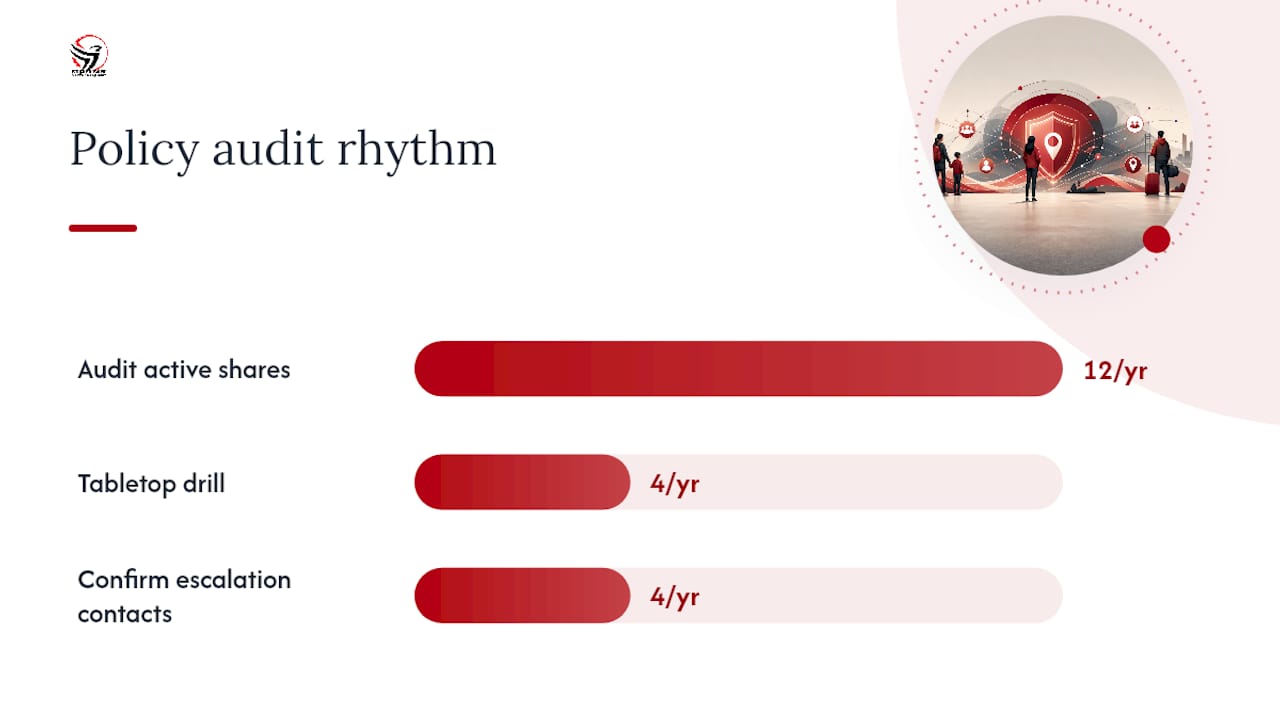
- Run a monthly audit of who’s actively sharing location and why.
- Schedule a quarterly tabletop drill built around a missed check-in scenario.
A simple audit rhythm keeps the policy alive: review active shares monthly, and once a quarter, confirm that every escalation contact listed is still reachable and still willing. CloseDaily’s field safety research treats sharing as a privilege tied to specific roles, with written consent logged centrally rather than assumed. That single habit, treating consent as documented rather than implied, is what separates a real policy from a suggestion. Brokerages and firms looking to close specific gaps can start with our breakdown of common REALTOR safety failures.
How does training make location sharing actually stick?
A protocol only works if people follow it without hesitating, and hesitation is exactly what training removes. Teams that rehearse check-ins and escalation scripts respond faster under real stress, according to field safety research from CloseDaily, because the routine is already familiar before it’s ever needed for real.
Streetsafeselfdefence delivers this training in a few formats: onsite workshops for small teams, mobile group sessions brought directly to your office or brokerage, trauma-informed modules built for survivors, and tailored sessions for real estate teams that layer identity verification and itinerary habits into the same training day.
Pro Tip: A five-hour session is enough to build muscle memory for check-ins and escalation, the same way a fire drill works: the value is in the repetition, not the length.
If your team needs a group booking or a mobile session brought onsite, visit Streetsafeselfdefence’s training programs to see current formats and availability.
Why routines beat tech fixes
I keep coming back to the same point when people ask me about location sharing: the app is the easy part. What actually protects you is whether you’ll make the call when a check-in gets missed, whether your itinerary message is specific enough to act on, and whether your escalation contact knows their job before the phone even buzzes. Tech fails. Batteries die, signal drops, apps glitch. A rehearsed routine doesn’t need a signal to work.
Trusted resources and next steps
A few public resources back up everything in this protocol. Cybertip.ca’s location-sharing alert covers itinerary documentation in detail, TechSafety’s survivor guide explains how to handle suspected tracking devices safely, and NAR’s safety planning resource offers a field-tested framework for professionals meeting clients alone. Apple’s own personal safety user guide walks through Safety Check for managing device-level sharing.
If you suspect ongoing stalking or abuse, contact a local advocate before changing any settings. For teams ready to build these routines into muscle memory, Streetsafeselfdefence’s mobile training programs bring hands-on sessions directly to your office, school, or brokerage.
Frequently asked questions
How long should I share my live location during a meeting?
Only for the length of the appointment itself. Set an end time when you turn sharing on, and let it expire automatically rather than leaving it running indefinitely.
Who should I choose as my location-sharing contact?
Pick someone who will actually notice a missed check-in and act on it, not just someone convenient. Choose a trusted individual who understands the escalation plan rather than an unattended group chat.
What if changing my location settings might alert someone monitoring me?
Document what you can safely, and speak with an advocate before changing any settings; removing a tracker or turning off sharing can destroy evidence and tip off the person watching you.
Is location sharing enough on its own to stay safe?
No. It’s one layer among several, alongside identity verification, a documented itinerary, a check-in cadence, and basic tactical habits like parking for an easy exit.
How often should organisations audit active location shares?
A monthly review of who’s sharing and why, plus a quarterly drill confirming escalation contacts are still reachable, keeps the policy from going stale.
Sources
- Cybertip
- Location tracking survivor guide (TechSafety)
- How to use your phone’s location sharing for safety (SafeWise)
- Planning your safety strategy (NAR)
- Personal safety user guide (Apple)
